
How I Work With Coding Agents in 2026
My MacBook Air started restarting by itself. The 512 GB disk was full, and most of what filled it wasn't mine: DerivedData and simulators from projects I had stopped working on, Docker images I had forgotten about, and whatever my coding agents had left behind.
A year ago I wrote about AI-assisted development with Copilot, and that post was mostly about instruction files and chat modes inside the editor. Today I run Claude Code, Codex and Cursor side by side every day. Not only for code: Grok Bot handles my meeting planning, invoice submission and QA.
The agents write good code most of the time. What kept getting in my way was everything around them: the context they start with, the questions they ask while I'm somewhere else, the disk they fill and the memory they hold.
So this is how I handle each of those today, and 3 of them ended up as Mac apps.
The Context Every Session Starts With
Rules in AGENTS.md
Every repo I work in has an AGENTS.md at the root, and Claude Code reads it through a CLAUDE.md that starts with @AGENTS.md. It's short and imperative on purpose, since every line in it is loaded into every session.
Here is the start of the one in this site's repo:
## Universal
- TypeScript `strict` on, no `any`, named exports only.
- Conventional Commits for every message.
- No new dependency without a one-line justification in the PR description.
- Errors: fail loud in dev, structured + logged in prod. No swallowed exceptions.
The rules don't say why. An agent can follow "no swallowed exceptions" without a paragraph on why, and the paragraph would cost context in every session that never touches error handling.
Where the Rules Come From
The reasons live somewhere else: in practice notes in an Obsidian vault, one note per convention, with the repos it has held in. A note starts as an idea, moves to trialing, and only becomes enforced once I've applied it again in a few repos.
Only enforced notes become rules. Right now the vault has 910 practice notes, and 92 of them are enforced.
The part that turns a note into the lines above is open source: second-brain-workflow. It renders the same rules into AGENTS.md, CLAUDE.md and Cursor's rules, so the 3 agents read the same thing. It's a set of scripts and skills today, and it will become a proper app soon.
Daily Notes, Skills and One MCP Setup per Project
3 smaller things carry the rest:
- Daily notes. At the end of a session the agent appends what it did and what it left open to that day's note in the vault, and the next session reads the open items back.
- Skills for workflows I kept explaining again. Adding a project to my portfolio is one: where the facts come from, how the device mockup is generated, what may not be published. It used to be a long prompt, now it's a skill the agent loads.
- Project-scoped MCP servers. When 2 sessions for 2 different products run at the same time, each one gets its own analytics and hosting accounts, configured in the repo. A global config is how one product's agent ends up reading another product's data.
Answering What the Agents Ask
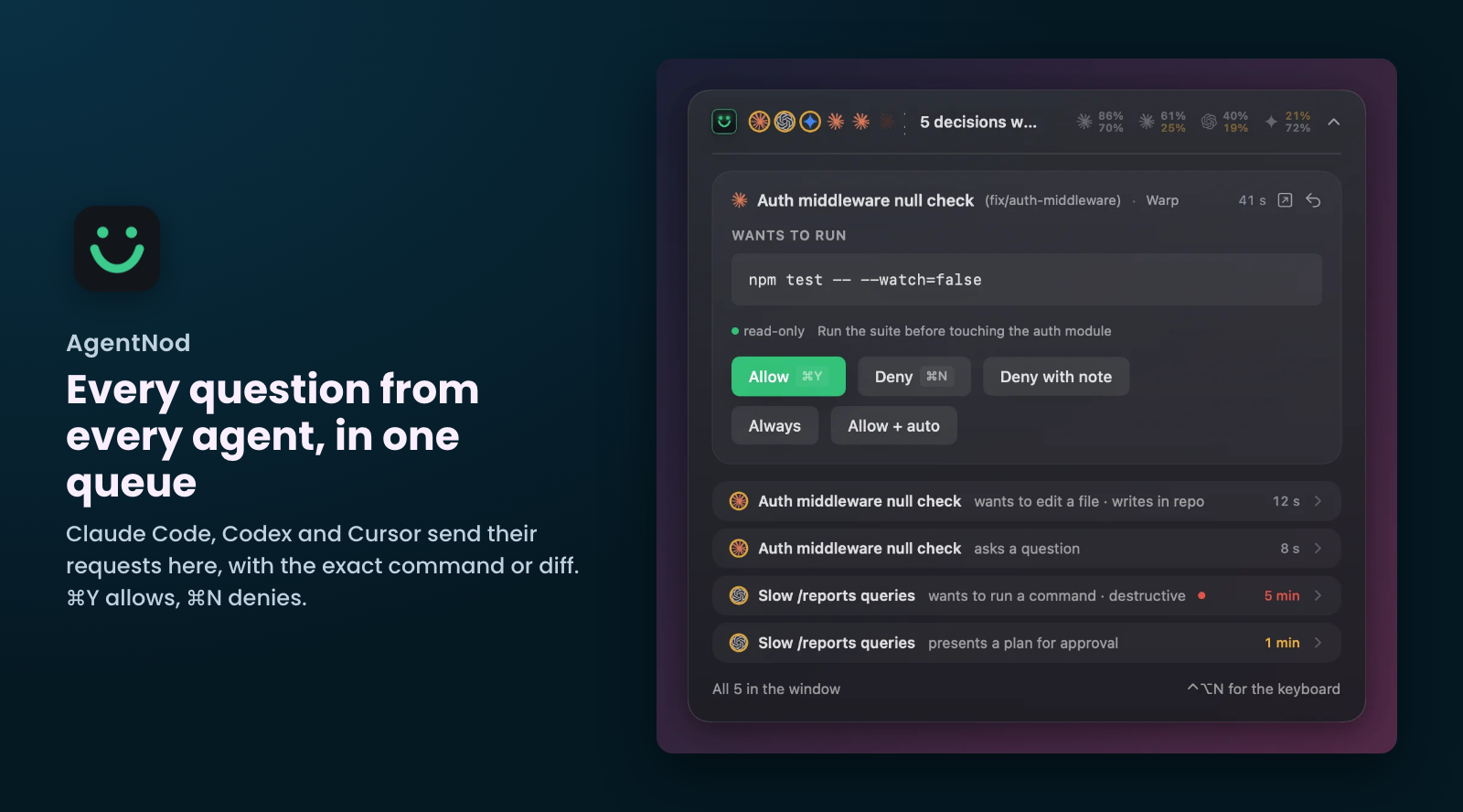
With 3 agents running, something is always waiting for a yes. Claude Code wants to run a command, Codex has a plan to approve, Cursor wants to call an MCP tool, and each one asks in its own window.
While I was working on Codex reviews and testing funnels, I left the Codex window behind Claude. It sat there waiting for my answer for 4 hours straight, and an agent waiting for a yes does no work.
The first fix is fewer questions. Read-only commands get allow rules per project (in Claude Code that's permissions.allow in the project's settings), so only the decisions that matter reach me. What's left still needs a person, and it needs to reach me wherever I am.
So I built AgentNod. Claude Code and Codex send their permission requests, questions and plans to it, and Cursor can route its shell and MCP approvals there too. Every request lands in one queue on the Mac, with the exact command or diff:
⌘Yallows,⌘Ndenies, and the agent carries on.- A destructive command, like a force push, is marked red and asks me to confirm.
- "Always" saves a rule for that command in that project, and for Claude Code it also writes it to
permissions.allow.
It's free for 48 hours, then €12.99 per Mac.
Worktrees, Docker and the Disk
Back to the MacBook that kept restarting. I let the agents create their own git worktrees, one per parallel session, so 2 agents never edit the same checkout. Each worktree gets its own node_modules or .venv, and Xcode builds each one into its own DerivedData.
I did try to delete them by hand, but I kept losing track of which ones were finished, and the disk filled up before I caught up. Together with the old simulators and the Docker images, that's where the 512 GB went.
The last time I counted, my Mac had 35 agent worktrees taking 46.77 GB, and 19 of them were merged and clean. The biggest, 13.32 GB, had uncommitted changes, and so did the third biggest, 4.65 GB. The one in between, 9.1 GB, was merged and clean.
So size and age don't tell you what's safe to delete. The branch state does.
That's how DevSweeper sorts them. It finds what dev tools leave behind (Xcode, simulators, package caches, Docker images and build cache, build folders, agent worktrees) and rates each item by what cleaning it would cost my current work:
- Merged and pushed worktrees can be removed. In my scan they ranged from Safe now to Expect a slowdown.
- One with unpushed commits is Expect a slowdown.
- One with uncommitted changes, or locked by the agent, is Affects active work and is never removed.
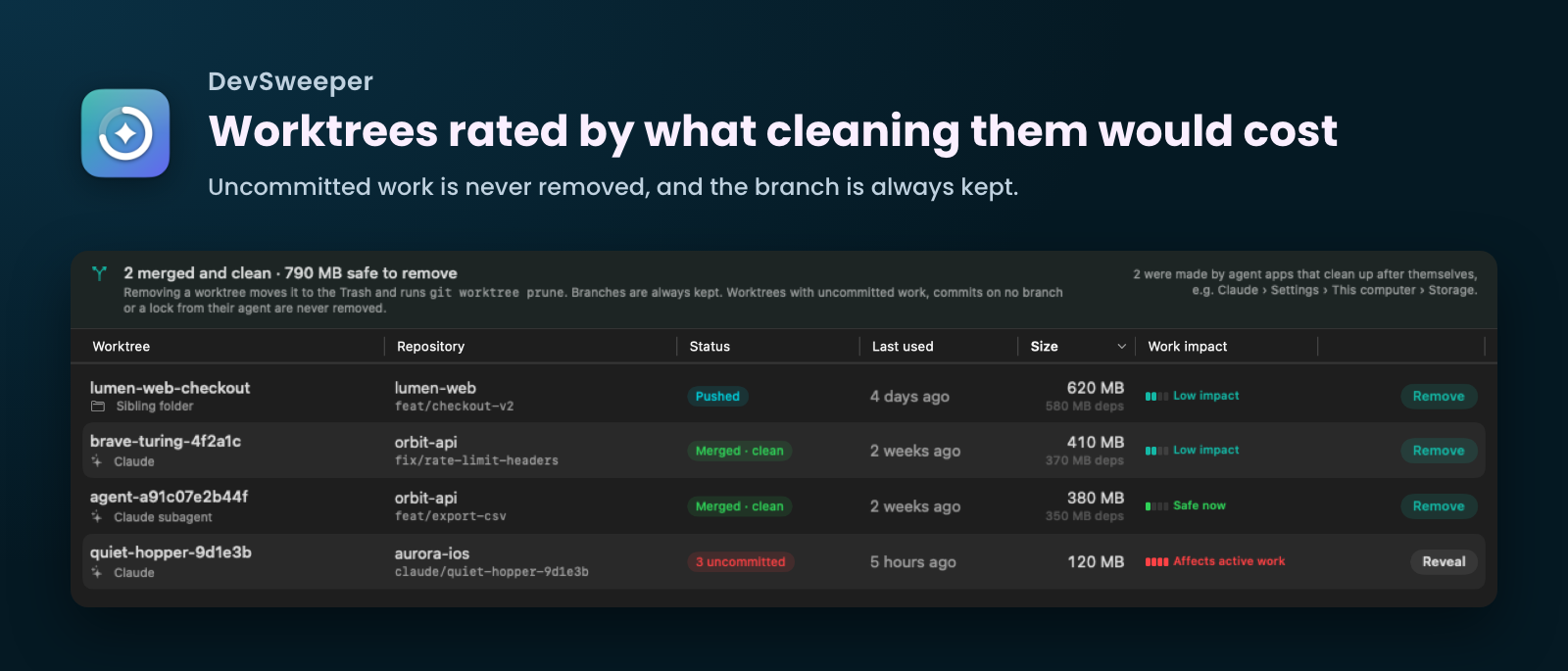
The default cleanup deletes only node_modules or .venv, so the worktree keeps working and the branch is always kept. Scanning is free, and cleaning from the app is €14.99 once for up to 3 Macs.
Which Project Is Using My Mac
Disk was one half. The other half was memory: too many dev servers still running that I had forgotten about, spread across projects and worktrees.
Activity Monitor shows me 900 processes. What I want to know is which project they belong to, and Activity Monitor doesn't group by project.
Overhead does. It's a menu bar app that adds up memory and CPU by the git checkout each process runs from, so node, xcodebuild and a dev server show up as one line per project and per worktree, with the agent sessions running in it. It also lists:
- the dev servers listening on ports, with the project they belong to and a Stop button
- booted iOS simulators, with their memory and a Shut Down button
- a keep-awake mode on Auto, which keeps the Mac awake while a long run is going and lets it sleep after
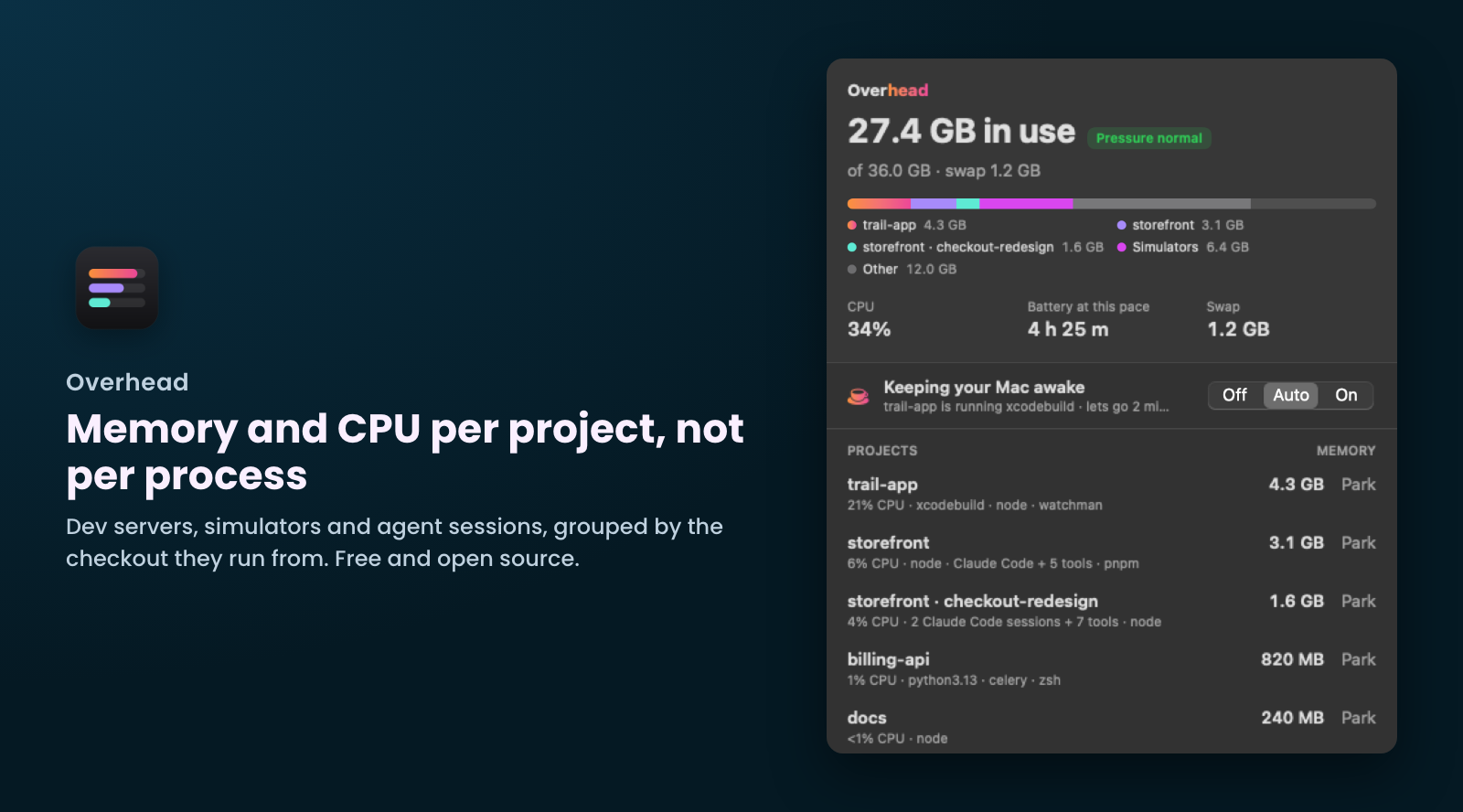
Overhead is free and open source (MIT), and Homebrew installs it:
brew install --cask dimeloper/tap/overheadIt updates itself after that, and its only network request is the daily update check.
What's Next
The 3 Mac apps are on my apps page, next to the mobile ones. Next on my list is turning second-brain-workflow into an app.
Cheers! 🍺